Intersystems IRIS \ Docker \ Openflights Dataset

Some links about the topic from title

https://github.com/andreas5588/openflights_dataset

https://community.intersystems.com/post/using-docker-container-group-iris-openflights-dataset-and-apache-zeppelin

https://community.intersystems.com/post/tips-and-tricks-brand-new-load-data-command

https://hub.docker.com/r/andreasschneiderixdbde/openflights-iris-zeppelin

https://hub.docker.com/r/andreasschneiderixdbde/openflights-iris

https://openexchange.intersystems.com/package/openflights_dataset

https://www.kaggle.com/datasets/sherrytp/airline-delay-analysis/code

The Million Song Dataset Challenge aims at being the best possible offline evaluation of a music recommendation system
https://www.kaggle.com/c/msdchallenge/overview

https://www.sqlservercentral.com/articles/departures-from-origins-and-arrivals-at-destinations

Do you want to query complex data structures in an iterative way? Do you have access to hierarchical data structures that need to be queried? This course will teach you the tools required to solve these questions. You will learn how to write recursive queries and query hierarchical data structures. To do this, you will use Common Table Expressions (CTE) and the recursion principle on a wide variety of datasets. You will, for example, dig into a flight plan dataset and learn how to find the best and cheapest connection between two airports. After completing this course, you will understand the principle of recursion, and be able to identify and create hierarchical data models.

https://www.datacamp.com/courses/hierarchical-and-recursive-queries-in-sql-server

This article aims at showing good practices on how to retrieve data with SQL using practical examples on the data above. The following topics are covered:

  • operations on columns
  • most common joins
  • aggregations and window functions
  • tips to handle complex queries

https://www.mit.edu/~amidi/teaching/data-science-tools/tutorial/queries-with-sql/

Have you ever wondered about the differences between a subquery and a common table expression (CTE) in SQL? The concepts seem very similar, but knowing the difference – and when to use each one – will help you write efficient and readable queries.
https://learnsql.com/blog/sql-subquery-cte-difference/

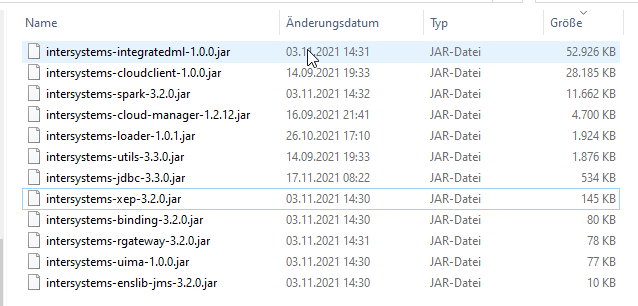
Copy InterSystems IRIS JDBC Driver from Docker Container to local filesystem

docker cp my-iris:/usr/irissys/dev/java/lib/1.8/ e:\temp

Files from InterSystems IRIS 2021.2 (preview)

https://hub.docker.com/_/intersystems-iris-data-platform/plans/222f869e-567c-4928-b572-eb6a29706fbd?tab=instructions

https://community.intersystems.com/post/copy-files-between-your-intersystems-docker-instance-and-your-host-jdbc-driver-sample

https://docs.docker.com/engine/reference/commandline/cp/

https://docs.intersystems.com/

InterSystems IRIS and IRIS for Health 2021.2 preview: https://community.intersystems.com/post/intersystems-iris-and-iris-health-20212-preview-published

2021.2 LOAD DATA

LOAD DATA FROM FILE filepath 
    [ COLUMNS (fieldname datatype, 
                          fieldname2 datatype2, ...) ] 
INTO table [ (fieldname, fieldname2, ...) 
    [ VALUES (headeritem,headeritem2, ...) ] ]
    [ USING {json_object} ]

LOAD DATA FROM JDBC connection TABLE jtable
INTO table [ (fieldname, fieldname2, ...) 
    [ VALUES (jfieldname,jfieldname2, ...) ] ]

https://irisdocs.intersystems.com/iris20212/csp/docbook/DocBook.UI.Page.cls?KEY=RSQL_loaddata

Two example repositories using LOAD DATA:

Fail fast\fail early

Fail-Fast (sinngemäß „schneller Abbruch“) bezeichnet die Eigenschaft eines Systems, Fehler frühzeitig zu erkennen. Ein Fail-Fast-System ist so konzipiert, dass es an seinen Schnittstellen Fehler oder Zustände, die zu Fehlern führen, erkennt und aufzeigt. Üblicherweise beenden sich Fail-Fast-Systeme im Fehlerfall selbst und versuchen nicht, mit dem Fehler weiterzuarbeiten

https://de.wikipedia.org/wiki/Fail-Fast

Why do computers stop and what can be done about it?
by Jim Gray

https://www.hpl.hp.com/techreports/tandem/TR-85.7.pdf

Apache Commons CSV

Commons CSV reads and writes files in variations of the Comma Separated Value (CSV) format.

The most common CSV formats are predefined in the CSVFormat class:

Custom formats can be created using a fluent style API.

https://commons.apache.org/proper/commons-csv/index.html

https://github.com/apache/commons-csv

Download java from oracle without login \ oracle account

Java SE 8u291 is the latest release for the Java SE 8 Platform
Java SE Development Kit 8u291
Windows x64
https://download.oracle.com/otn-pub/java/jdk/8u291-b10/d7fc238d0cbf4b0dac67be84580cfb4b/jdk-8u291-windows-x64.exe

Java SE Development Kit 11.0.11
Windows x64 Installer
https://download.oracle.com/otn-pub/java/jdk/11.0.11%2B9/ab2da78f32ed489abb3ff52fd0a02b1c/jdk-11.0.11_windows-x64_bin.exe

Windows x64 Compressed Archive
https://download.oracle.com/otn-pub/java/jdk/11.0.11%2B9/ab2da78f32ed489abb3ff52fd0a02b1c/jdk-11.0.11_windows-x64_bin.zip

Java SE Development Kit 16.0.1
Windows x64 Installer
https://download.oracle.com/otn-pub/java/jdk/16.0.1+9/7147401fd7354114ac51ef3e1328291f/jdk-16.0.1_windows-x64_bin.exe

Windows x64 Compressed Archive
https://download.oracle.com/otn-pub/java/jdk/16.0.1+9/7147401fd7354114ac51ef3e1328291f/jdk-16.0.1_windows-x64_bin.zip

To download any JRE or JDK from the Oracle download page without signing in, go to the downloads page for the version you want (such as https://www.oracle.com/java/technologies/javase-downloads.html) and click on the Download link of your choice.

When a window pops up saying you need to accept the license agreement, check the box that says you agree. But instead of clicking on the green Download link (which will send you to the login page), right-click the download link and select Copy Link Location.
NOTE: If clicking Download doesn’t show a box and takes you straight to the login page instead, you will need to clear your cookies on the Java website (or open in incognito mode). Paste the copied link into a text editor like Notepad. You’ll see the link points to something like oracle.com/webapps/redirect/signon, but it has a query attached that starts with „nexturl=“. The URL that follows nexturl= is the actual link that will download the file to your computer.

If you want to download any JRE or JDK without signing into Oracle, go to the downloads page for the version you want (such as https://www.oracle.com/java/technologies/jdk12-downloads.html) and right-click on the Download link of your choice. Select „Copy Link Location“ and then paste it into a text editor like Notepad.
NOTE: you may need to change the otn in the path to otn-pub as described below.

https://gist.github.com/wavezhang/ba8425f24a968ec9b2a8619d7c2d86a6